Itemlist capabilities
Last updated January 12, 2026
Item List Feature – Organize, Print, and Act on Items Faster
The Item List feature in our POS helps you quickly group items together and take action on them later. Instead of working with items one by one, you can build a list and use it for printing, ordering, or planning—saving time and reducing mistakes.
What Is an Item List?
An Item List is a saved collection of items that you choose from your inventory. You can add items to a list at any time and use that same list across multiple workflows.
You’ll see “Add to Item List” available when you edit an item in the POS and the mobile app.
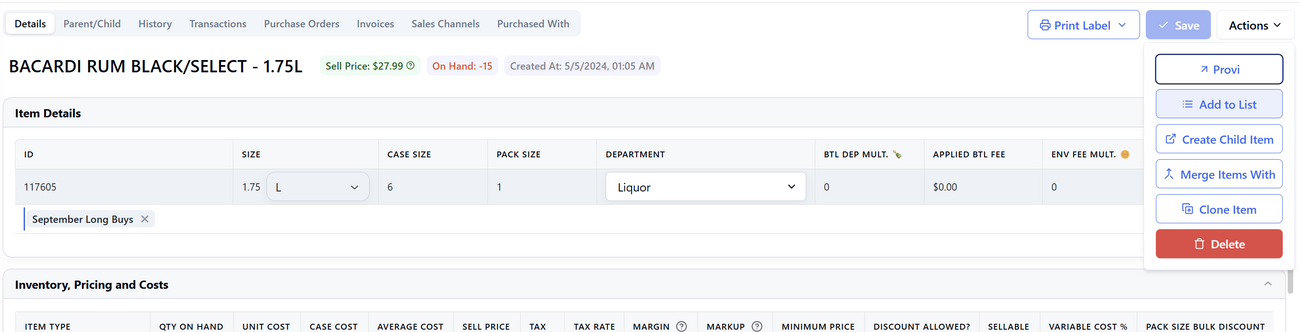
Common Ways to Use Item Lists
1. Create a Focus or Task List
If you’re working on a specific group of products—such as:
- Slow-moving items
- Items going on promotion
- Products needing price updates
You can add them to an Item List and come back to them later instead of searching repeatedly.
2. Scan Items with Your Phone & Print Labels Later
One of the most popular uses of Item Lists is label printing:
- Use your phone to walk around the store
- Scan items you want labels for add each scanned item to an Item List
- Return to the computer
- Print all labels at once from the list
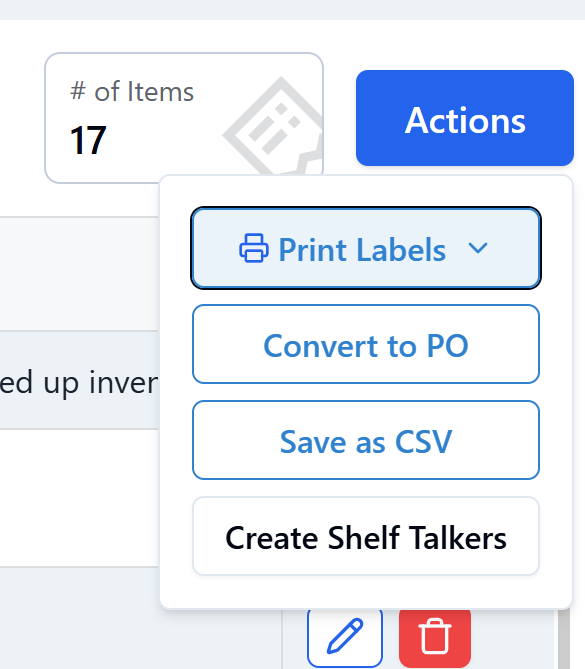
This eliminates repeated trips back and forth and makes label printing much faster.
3. Create Purchase Orders from an Item List
The same Item List can be reused to:
- Create a Purchase Order
- Export the list as a CSV
- Share or review items before ordering
This is especially useful when planning reorders or vendor discussions.
4. Generate Shelf Talkers
You can also use an Item List to:
- Create shelf talkers
- Print signage for a specific section or promotion
Because the list is reusable, you only need to build it once.
Why Use Item Lists?
- Save time by working with items in bulk
- Avoid re-searching the same products
- Move seamlessly from scanning → printing → ordering
- Reuse the same list for multiple purposes
Pro Tip
You can create multiple Item Lists for different workflows—labels, reorders, promotions, or audits—so everything stays organized and easy to access.