Spirits 2000
Last updated January 2, 2026
Ensure Anydesk is Setup via the Transformity Link
- Make sure the customer has Anydesk installed and configured using the Transformity setup link provided.
Barcode Scanner Requirements
- Customers migrating from Spirits2000 must use a supported Honeywell or Zebra barcode scanner.
Other scanner brands or models are not compatible and will not work with the system.
File Transfer
Navigate to the Spirits2000 File Directory
The default file path is: "C:\ksv\Data"
Copy the Following Files
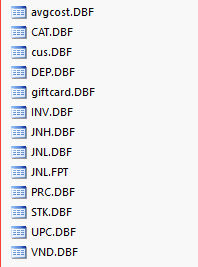
Data Loading
Customer Data Import Rules: Customer data will be imported with the following limitations and validation rules:
- Duplicate Customer IDs
- The first record is kept
- All additional duplicates are dropped
- Club Card Duplicates
- If a customer has a club card, duplicates related to the same card will also be dropped
- Phone Number Validation
- Phone numbers must be 10 digits
- Invalid phone numbers will be removed
- If a customer has no phone number, a 555 placeholder number will be assigned, as a phone number is required
- Points Import
- Points will be imported if present
- Only positive point values are accepted
- Points will be rounded
- Email Validation
- Invalid email formats will be removed
Export Using the .bat File (Automated Method)
As an alternative to the manual export steps above, you can now export Spirits2000 data automatically using the provided batch file.
Steps
- Download the Spirits2000_Local_Export.bat file to your Desktop.
- Double-click the file to run it.
- The script will automatically:
- Create a new folder on the Desktop named with today’s date
- Example:
2025-11-18(Do not interrupt the export process—closing the script or copying the folder early may result in incomplete or corrupted data)
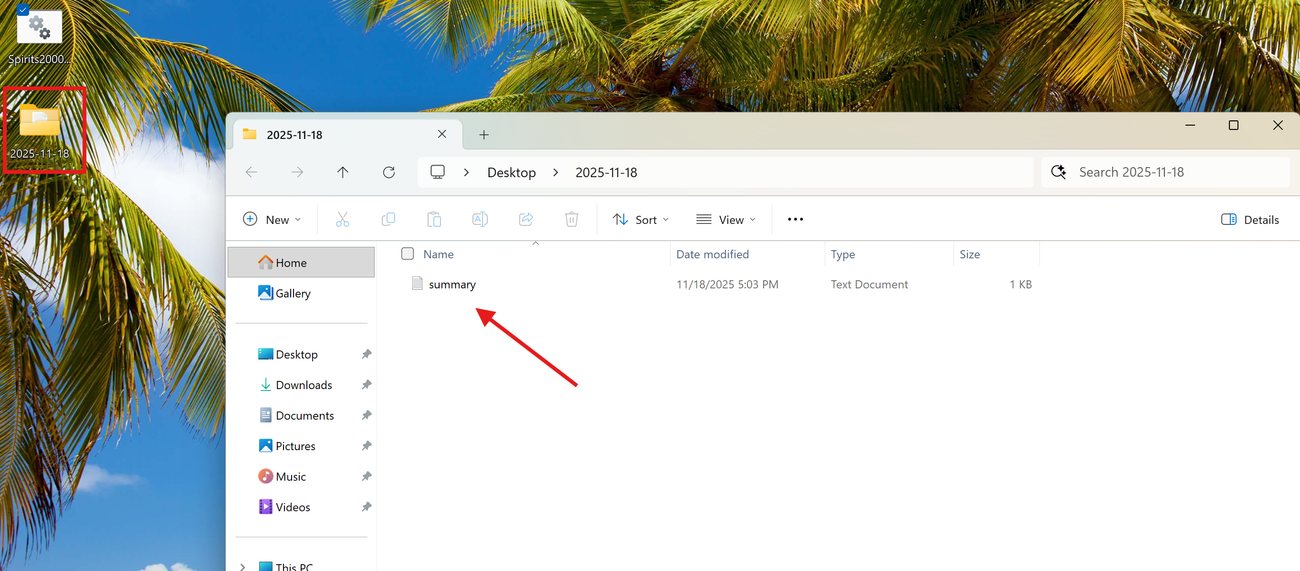
- It will get all required Spirits2000 data files into this folder
- The summary.txt file will include:
- Date & time of export
- Source and destination file paths
- List of successfully copied files
- List of any missing files not found in the source directory
- Please verify the exported files manually using the
summary.txtfile. If a file name differs from what the script expects (for example,giftvsgiftcard), it will not be exported—open the summary file to confirm all files were copied and manually locate any missing files in the source folder.
Notes
- No configuration is required — the process is fully automated.
- This tool must be run on the Server PC.
- It will not work from a remote workstation.
- If the summary file lists missing files, verify whether those files exist in: "C:\ksv\Data"
Was this article helpful?